
All innovations

Healthy aging and connection

A caring companion for the people you love

NanaBot is a friendly low-cost robot that lives in the home of an older adult. It chats with them throughout the day, reminds them to take their medicine, and watches for falls, so families can feel reassured even when they can’t be there in person.

It plugs into the wall, connects to home Wi-Fi, and needs no technical know-how from the person using it. A family member sets it up once, and NanaBot takes it from there.

  • Chats through the day
  • Reminds about medicine
  • Watches for falls
  • Looks the way you build it
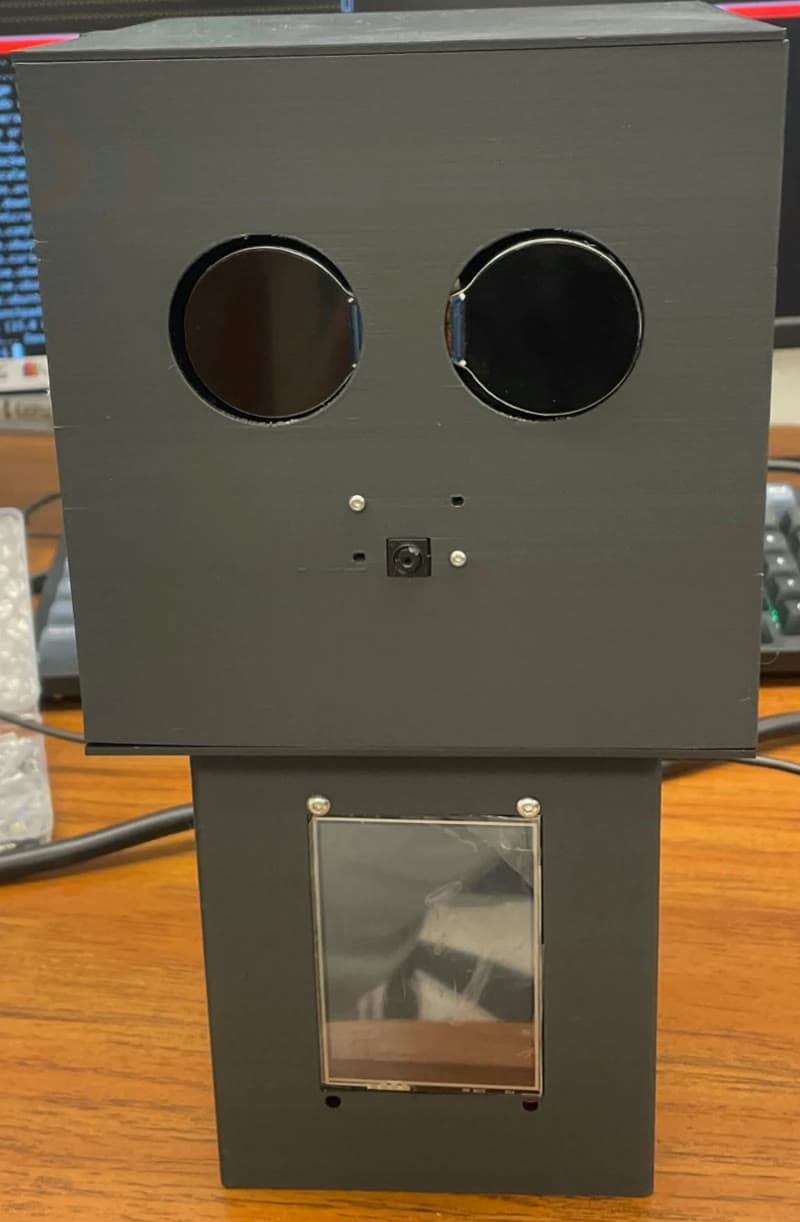
The NanaBot prototype: a friendly white robot with round screen eyes and a touchscreen on its chest, greeting an older woman at home.
NanaBot prototype

Conversation, medicine reminders, and fall detection in one friendly robot you can make your own.

  • Companionship
  • Medicine
  • Safety
  • DIY look

What NanaBot does

Company, reminders, and a watchful eye

A companion to talk to

NanaBot holds warm, natural conversations. Just say its wake word and talk. It answers in a calm, clear voice, and its animated eyes and screen react as it listens and speaks.

Its personality is patient and gentle, like a kind nurse who always has time for a chat.

Coming soon

Remembers what matters

NanaBot will remember the people, stories, and preferences that make each person who they are: a grandchild’s name, a favorite song, how their knee felt last week, or that they prefer tea in the afternoon.

Over time, every conversation will feel like catching up with someone who knows them, not starting over with a stranger.

Fall detection

NanaBot uses a small built-in vision chip to recognize people in the room. It learns each person’s normal standing height and follows how their posture changes from moment to moment.

That lets it tell a real fall apart from sitting down, crouching, or lying down on purpose, so it raises the alarm when it matters and stays quiet when it doesn’t.

Stays quiet

  • Sitting down
  • Crouching
  • Lying down on purpose

Raises the alarm

  • A real fall

When a fall is detected, NanaBot immediately:

  • Stops whatever it was saying
  • Sounds an alarm and shows an emergency message on its screen
  • Switches its eyes to a warning expression
  • Records the event so caregivers can see it in the NanaBot dashboard

No wearable is needed, and nobody has to remember to press a button. NanaBot does not contact emergency services. Read more below.

Medicine reminders

At each scheduled time, NanaBot plays a chime, shows the medicine on screen, and says it aloud. If the reminder isn’t confirmed, NanaBot gently repeats it every minute until the person says they’ve taken it.

  • Reminders can be set up just by asking NanaBot
  • They keep working even if the internet goes down

Recipe ideas

Tell NanaBot what’s in the fridge and any dietary needs, such as diabetic-friendly, low salt, or allergies, and it suggests suitable recipes on screen.

  • Choose a recipe by voice or touch
  • Scan the QR code to open the full recipe on a phone

Make it yours

Build NanaBot your way

NanaBot’s appearance is designed to be customized and built by the people who use it. We offer tools that let you shape how your NanaBot looks, in the spirit of a maker community.

  • Make the look your own

    Customize NanaBot’s appearance with the tools we provide, so it feels like it belongs in the home it lives in.

  • Build it yourself

    DIY is part of the design. You can build and personalize your own NanaBot.

  • Join a community of makers

    Like building-block hobbies, DIY is better together. Makers can share ideas and designs with each other.

Ask about the customization tools

Illustration. Colors and accessories shown are examples.

See NanaBot in action

A day with NanaBot

Four short animations show how NanaBot fits into everyday life at home.

Good morning!Good morning! Didyou sleep well?Like a baby!Time for yourmedicine!A gentle reminder!I took it!Crouching: no alarmFall detectedFall recordedSaved for caregiversScan for thefull recipeEggs, spinach, lowsalt, please!Pick by voice or touch

Animated illustrations, not footage. Scenes loop automatically; use the button on the animation to pause.

For caregivers

Peace of mind for families

Caregivers sign in to the NanaBot dashboard from any web browser. Each account only shows the devices that family owns.

  • See fall history
  • See the medicine schedule
  • See whether NanaBot is online
Coming soon
  • A mobile app for iPhone and Android
  • Instant alerts to caregivers’ phones
  • Changing the medicine schedule remotely
Caregiver dashboard Animated illustration

Privacy

Privacy you can trust

NanaBot is designed for the most personal place there is: someone’s home.

Video never leaves the device

The camera is only used for fall detection, and images are processed inside NanaBot itself. No photos or video are ever sent or saved.

It only listens after its wake word

NanaBot doesn’t send any audio until it hears its name.

Voice recordings aren’t kept

Speech is converted to text and the audio is deleted right away.

Family accounts are private

Only the caregivers you register can see your NanaBot’s information.

Getting started

Set up in a few minutes

A family member does this once. The person living with NanaBot needs no technical know-how.

  1. Plug it in

    NanaBot plugs into a standard wall outlet and is designed to stay in one room, such as the living room or bedroom. It doesn’t need to be charged.

  2. Connect it to Wi-Fi

    Connect NanaBot to the home Wi-Fi network (2.4 GHz).

  3. Register it in the dashboard

    Add NanaBot to the caregiver dashboard. After that, NanaBot takes it from there.

Most families are done in a few minutes.

FAQ

Questions families ask

Does NanaBot work without internet?

Medicine reminders and fall alarms keep working on the device itself. Conversation, recipe ideas, and dashboard updates need an internet connection and resume automatically when it returns.

Can I change how NanaBot looks?

Yes. NanaBot’s appearance is designed to be customized and built by its users, and we offer tools to help you personalize it.

Will NanaBot call 911?

No. NanaBot sounds an alarm in the home and records falls for caregivers to review, but it does not contact emergency services. It is an assistive product, not a medical device or a replacement for emergency response or professional care.

Is it hard to set up?

No. Plug it in, connect it to Wi-Fi, and register it in the caregiver dashboard. Most families are done in a few minutes.

Does it need to be charged?

No. NanaBot plugs into a standard wall outlet and is designed to stay in one room, such as the living room or bedroom.

Specifications

At a glance

Price
As low as 5% of regular AI-enabled companion robot
Conversation
Natural spoken English with a gentle, caring personality
Safety features
Fall detection with alarm; medicine reminders
Display
Touchscreen plus animated expressive eyes
Vision
Built-in camera with an on-device vision chip (Grove Vision AI V2)
Sound
Built-in speaker and microphone
Connection
Home Wi-Fi (2.4 GHz)
Power
Plugs into a wall outlet; no charging needed
Caregiver access
Web dashboard today; mobile app coming soon
Appearance
Customizable and DIY, with tools we provide
Size and weight
Lightweight, kids-friendly
Partnerships

Build the future of responsible AI with us.

We welcome conversations with healthcare organizations, cybersecurity experts, universities, community groups, funders, and mission aligned investors.